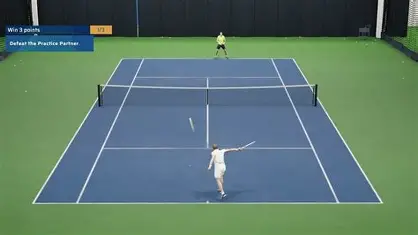
Here is the good news before we start: you do not need a smart court, a special tripod, or a four-figure camera to get pro-level match data. You need a phone, a sensible spot to put it, and about two minutes of setup. The footage that powers a full point-by-point breakdown — serve placement, rally length, win patterns, technique — is the same footage you could shoot this weekend on the camera already in your pocket.
The catch is that how you film matters more than what you film with. A perfectly good phone pointed from the wrong place produces messy data; a five-year-old handset placed correctly produces clean, analysable footage. This guide walks through exactly how to record a tennis match for analysis so that whatever tool you upload to — Ten-Fifty5 included — has everything it needs to read your game.
Why camera position is the whole game
AI match analysis works by tracking the ball, the bounce, and both players across every point. To do that reliably, the system needs a stable view that shows the full court and both baselines. Get the angle right and the computer vision has a clean picture to read. Get it wrong — camera too low, off to one side, or wobbling on a bench — and the same software has to guess, which is where errors creep in.
So before you think about megapixels or frame rates, fix the position. It is the single biggest factor in whether your match turns into trustworthy data.
The ideal setup: behind the baseline, centred, up high
The gold-standard angle for full-match analysis is simple and consistent with what tour broadcast cameras use:
- Behind the baseline. Place the camera at the back of the court, directly behind the player, looking straight down the length of the court. This "down the line" view captures both players, the net, and the full bounce path of the ball.
- Centred on the middle of the court. Line the camera up with the centre mark, not off to one side. An off-centre camera distorts how the system reads court position, alignment and shot direction.
- As high as you reasonably can. Chest height works; fence-top height or higher is better. Elevation flattens the perspective so the far baseline is visible and the ball does not disappear behind the near player. If your club has a balcony, gallery, or high fence mount, use it.
That is the entire recipe: back of court, centred, elevated, capturing both baselines. Everything else is refinement.
What you can film with (almost anything)
You do not need dedicated hardware. Any of these will produce footage good enough for analysis:
- A smartphone — iPhone or Android, even an older model. This is what most players use, and it is more than enough.
- An action camera (GoPro and similar) — great because the wide lens captures the full court easily.
- A club or facility camera — many indoor centres and academies have fixed cameras that already produce exactly the right view.
- A DSLR or camcorder — overkill, but perfectly fine if it is what you have.
Export or record as a standard MP4 or MOV file. Resolution of 720p or higher is plenty — there is no need to fill your storage with 4K. Ten-Fifty5 accepts any common format from any camera, which is the whole point: bring the footage you can actually capture, not the footage a hardware brand wants to sell you.
Stabilise it — the one rule you cannot skip
A shaky camera is the fastest way to ruin otherwise good footage. The tracking system needs the court to stay still in the frame from the first point to the last. Two reliable options:
- A tripod behind the baseline, extended to chest or head height. A cheap phone tripod is fine; what matters is that it does not move.
- A fence mount clipped to the back fence. These are inexpensive, fold flat in a bag, and put the camera at a naturally good height.
Whatever you use, set it up once, frame the shot, and leave it alone for the whole match. Do not hold the phone, and do not let a well-meaning parent "follow the action" — a fixed, locked-off camera beats a moving one every time for analysis.
Do you need a dedicated camera stick or mount?
Short answer: no. Several tennis-analysis products sell a matching hardware accessory — a branded stick, pole or court mount whose job is to hold your phone steady at roughly fence height, pointed down the court. They work. But it is worth being clear about what you are buying: a stand. The mount does not analyse anything, and nothing about the footage it captures is proprietary.
That means the alternative to a branded stick is not a different branded stick. It is any of these, all of which put the camera in the same place:
- A basic phone tripod, extended to head height behind the baseline. The cheapest option that works, and the one most players end up using.
- A fence clamp or gooseneck mount, clipped to the back fence. Folds flat into a racquet bag and sits at a naturally good height without you having to think about it.
- An existing club camera, balcony or gallery — free, and usually already at the ideal elevation.
- A tall bag propped against the fence. Genuinely fine in a pinch, as long as it cannot fall over mid-match.
The one requirement that actually matters is the one from the section above: it must not move. A R200 tripod that stays perfectly still produces better data than an expensive mount that drifts in the wind. And because Ten-Fifty5 analyses an ordinary uploaded video file rather than a live feed from a specific device, no part of your setup is locked to a brand — film on whatever holds your phone steady, upload, and the analysis is identical.
Frame the shot: a 30-second checklist
Before you hit record, glance through the frame and confirm:
- Both baselines are visible, with a little space above the far one.
- The full width of the singles court (and the lines) is in frame.
- The camera is centred on the middle of the court, not angled off to a side.
- The near player does not block the far half of the court.
- The lens is clean (a quick wipe — fingerprints blur ball tracking).
- The phone is in landscape, not portrait.
Settings that help (and ones that do not matter)
Worth getting right
- Landscape orientation. Always. Portrait crops out half the court.
- Good light. Film in daylight or under proper court lighting. Bright, even light gives the cleanest ball tracking; heavy shadows and dusk glare are the enemy.
- Lock focus/exposure if you can. Tap and hold on the court to stop the phone re-focusing every time a player crosses the frame.
- Enough storage and battery. A full match is a long recording. Clear space beforehand and bring a power bank for longer sessions.
Don't overthink
- Frame rate. Standard 30fps is fine for match analysis. High-speed slow-motion is nice for technique close-ups but not required.
- 4K resolution. Unnecessary — 720p–1080p analyses just as well and uploads far faster.
- Audio. Irrelevant to the data. Film in a quiet wind or a noisy club; it makes no difference.
Filming a junior's match? A note for parents and coaches
If you are recording a child's tournament or a player you coach, the same rules apply — and a fixed camera is actually easier than trying to film by hand from the stands. Set it up behind the court before the warm-up, press record, and watch the match like a normal spectator. You walk away with footage you can upload later, turning a tournament you sat through into a full data set you can review together in the next session. For coaches managing several players, that means match data from events you never travelled to. (More on the coaching workflow here.)
Frequently asked questions
Do I need to buy a special tennis camera stick or mount? No. A branded stick is a phone stand — it holds the camera steady at height and does nothing else. Any tripod, fence clamp or club camera that gives you a stable, centred, elevated view behind the baseline produces exactly the same quality of footage and exactly the same analysis.
Does the analysis depend on which camera or mount I use? No. Ten-Fifty5 works from a standard uploaded video file (MP4 or MOV, 720p or better) from any device — Android phone, iPhone, GoPro, DSLR or a fixed club camera. There is no proprietary hardware anywhere in the chain.
What height should the camera be at? As high as you can reasonably manage. Chest height works, fence-top height or above is better — elevation keeps the far baseline visible and stops the ball disappearing behind the near player.
From footage to insight
Once you have a clean, stable, full-court recording, the hard part is over. Upload the file and the analysis does the rest — every shot tracked, every bounce located, every point reconstructed into serve placement heatmaps, rally-length distributions, win-pattern breakdowns and a technique score, all without a single minute of manual tagging. The better your footage, the sharper the data — which is exactly why two minutes of setup is the highest-value thing you will do all match.
Game. Set. Data.
See your own game in data
Your first match is free — no credit card. Full dashboard, heatmaps, and AI coaching in a couple of hours.
Analyse my first match free